

New Store Account Page
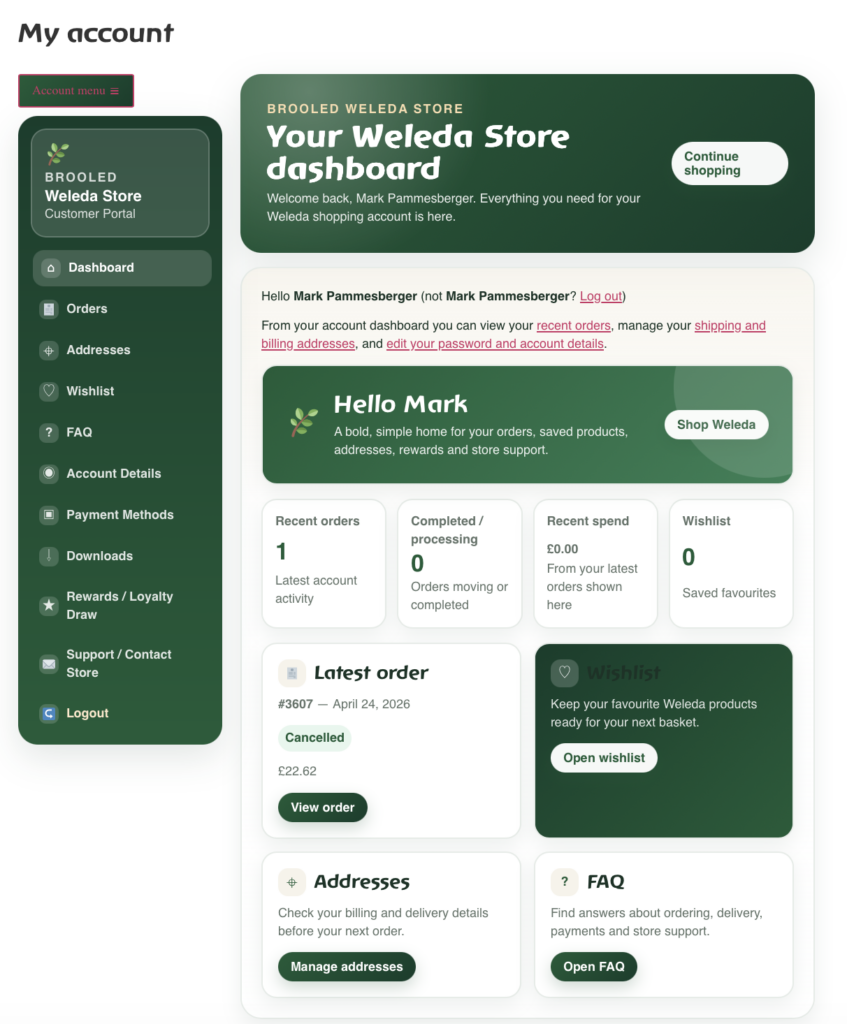
BROOLED WELEDA STORE A new customer account experience for the Weleda Store Our Weleda Store account area has been redesigned from the ground up to make shopping, checking orders, saving favourites and contacting us feel clearer, warmer and more useful. Open My Account Continue shopping Custom-built for BROOLED customers Dashboard, orders, wishlist, rewards, FAQ, contact and more. We are excited to introduce the new BROOLED Weleda Store customer account design. This is more than a fresh coat of paint on the standard WooCommerce account area. It is a custom-built customer portal made especially for our shop, with a clear green design, simple navigation, modern cards, helpful shortcuts and features that make managing your account much easier. The aim is simple: when you log in, you should immediately know where everything is. Your dashboard should not feel like a technical back office. It should feel like a helpful home for your Weleda shopping account, with your latest order, saved addresses, wishlist, support links and account details all organised in one place. That is exactly what this new design is intended to do. The new layout brings together Dashboard, Orders, Addresses, Wishlist, Rewards / Loyalty Draw, Account Details, Payment Methods, Downloads, FAQ and Support / Contact Store into one consistent customer area. Each section has been styled to feel part of the same experience, so you are not jumping between plain default pages and custom pages. Whether you want to check a past order, update your delivery details, send us a message or save products for later, the account area now has a smoother path for it. SCREENSHOT GALLERY Explore the new account area Scroll through the screenshots below. Click any image to zoom in and look more closely. Demo customer details are shown for preview purposes. Dashboard overviewThe new dashboard brings the main account actions, latest order, wishlist and support links into one clean customer home screen. Orders and exportsCustomers can view orders online and export order history as PDF or Excel when they need a copy for their records. Saved addressesBilling and shipping addresses are shown in modern cards so customers can keep delivery information up to date. Named wishlists and sharingCustomers can create a named wishlist, copy a unique share link, or share through Facebook, X, WhatsApp and email. Account detailsThe profile and password screen has been redesigned to make account updates clear and simple. Rewards / Loyalty DrawThe rewards area is prepared for the BROOLED Monthly Loyalty Draw integration and customer participation history. Contact the storeA customer support section now includes a contact form directly inside the account area. Dashboard cardsThe account dashboard uses clean cards for quick access to orders, addresses, wishlist and FAQ. WHAT IS NEW Every account section has been reworked The design uses icons, cards and clear headings so the most useful actions are easier to find. Dashboard A clearer home screen for recent orders, saved favourites, addresses, rewards, help and account shortcuts. Orders View order details online, open individual orders, and export order history as PDF or Excel. Addresses Billing and shipping details are now easier to review before placing the next order. Wishlist Create named lists, save favourite products, copy a unique share link and share by X, Facebook, WhatsApp or email. Rewards / Loyalty Draw A dedicated rewards area is ready for monthly draw information, participation records and winner history. Payment Methods Payment options stay inside the same customer area, with a cleaner layout and consistent navigation. FAQ Fast answers for delivery, returns, ordering, payments and shop support are one click away. Contact Form Customers can message the BROOLED Weleda Store team directly from inside the account area. A better dashboard when you log in The dashboard is the first place most customers land after signing in, so it needed to do more than just show a few basic account links. The new dashboard has been designed as a proper customer home screen. It welcomes you back, gives you a short explanation of what you can manage, and then presents the most important account actions in a clean card layout. At a glance, you can see recent order activity, completed or processing orders, recent spend information and the number of saved wishlist items. There is also a latest order card, so you can jump straight into the most recent order without hunting through the full order history. For customers who return to the shop regularly, this makes the whole experience quicker and more reassuring. The dashboard also highlights useful areas such as Wishlist, Addresses and FAQ. These are not hidden away at the bottom of the page. They are shown as simple cards with clear buttons, so the next step is obvious. Need to check where your next parcel will be delivered? Open Addresses. Want to come back to favourite Weleda products later? Open Wishlist. Need a quick answer about orders, delivery, payments or support? Open FAQ. Orders are clearer, and exports are now available The Orders section has also been improved. You can still view your orders online, but the new design presents the information in a cleaner table with obvious action buttons. Order number, date, status, total and actions are grouped together so you can quickly understand what happened with each order. One of the most useful new features is order export. Customers can now download order history as a PDF or Excel file. This is especially helpful if you like keeping personal purchase records, need a copy for budgeting, want to check previous product purchases, or simply prefer having your order information saved outside the website. You can also export an individual order where available, or view the order online as usual. The goal is to give you more control over your own information. Instead of being limited to viewing order history only on the website, you can take a copy in a format that works for you. PDF is ideal for a tidy, printable record. Excel is ideal if you prefer sorting, filtering or keeping a